Anyone who has made a few AI videos knows the feeling. The individual clips look great. One prompt gives you a striking opening shot, another gives you a decent close-up, a third nails the background music. Then you try to turn them into a film, and the whole thing falls apart.
The characters don’t match. The lighting changes between shots. The pacing is off, and half the files are in the wrong format. The problem isn’t the quality of any single prompt. It’s the workflow around them, and that is what most teams struggle with.
Why separate prompts don’t add up to a film
A prompt produces a moment. A film needs continuity. Those are different jobs.
When you generate each shot on its own, the model has no memory of the shot before it. It doesn’t know the lead character wears a green jacket or that the scene takes place at dusk. You carry that context in your head and try to repeat it in every prompt, and small differences creep in.
By shot ten, you are fixing what shot four broke. People call this prompt fatigue, but it’s really a missing process. Filmmakers have always worked from scripts, storyboards and shot lists because a film is a plan, not a pile of good moments.
The five places the workflow usually breaks
1. Planning. Many AI projects start with generating, not planning. Without a script and a shot list, you end up with clips that look good alone and don’t fit together.
2. Consistency. Faces, outfits, products and settings drift between generations. Viewers notice, even if they can’t say why.
3. Tool sprawl. One tool for images, another for video, another for voice, another for upscaling. Each has its own login, credits and quirks, and each export is another chance to lose quality or a file.
4. Audio. Voice, music and sound effects are often added last, and syncing them to the picture takes more time than people expect, especially when dubbing into other languages.
5. Delivery. A finished film rarely goes out in just one format. Social placements need vertical and square versions, subtitles need translating, and clients ask for changes after approval.
If your process has gaps in two or more of these areas, scaling up will be painful.
A better way to think about it
Instead of asking “which model makes the best clip,” ask “what does a full pipeline look like, from idea to delivery, and where can I keep context from one step to the next?”
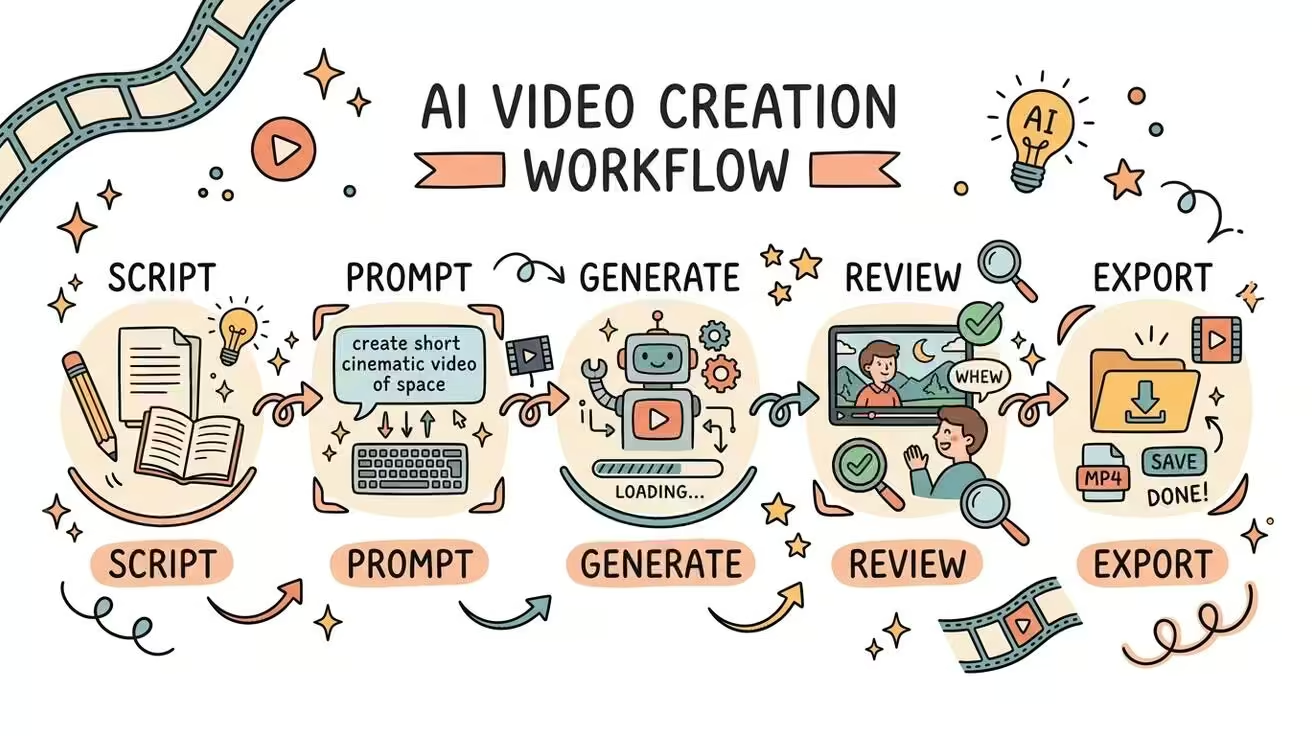
A workable pipeline usually looks like this:
- Write the script and break it into scenes and shots.
- Lock the characters, products and look before generating anything.
- Generate shots using whichever model suits each one.
- Add voice, music and effects, synced to picture.
- Edit, upscale and resize for each placement.
- Save the process so it can be repeated on the next project.
The key idea is that references, such as faces, brand colors and approved assets, are stored once and reused, not rebuilt for every prompt. That single habit removes a large share of the drift problem.
What this means for agencies
For a freelancer making one film, a bit of manual juggling is fine. For an agency running several campaigns at once, it becomes a cost problem. Hours go into re-uploading references, hunting for approved versions and exporting the same video in five sizes.
This is where ai filmmaking software for agencies differs from a general-purpose generator. Agencies need shared libraries, team permissions, credit controls and reusable workflows, because many people touch the same project and clients expect repeatable results. The creative idea is only part of the job; the other part is operations.
Where connected platforms fit in
A growing group of tools now try to bring the pipeline into one workspace. LemonPeel is one example. It places text, image, video and sound on a single canvas and offers access to several video models, such as Seedance, Kling and Wan, so you can pick a model per shot without switching products. Its feature list covers many of the steps above: Character Consistency to keep one face across a sequence, an Asset Reference System and Brand Kit for reusable assets and locked branding, Film Studio for scene-by-scene work, Camera Control for changing angles, Clone Voice, Speech and Music & SFX for audio, and Translate & Lipsync and Subtitles for 100+ languages. For delivery, Reframe & Resize creates other aspect ratios from one master, Flows let you chain steps once and reuse them, and Team Controls manage members and credits. A Lemonpeel Agent, still in beta, is designed to take a brief and return a cut.
As with any platform, the best test is a real project from your own queue, not a demo.
How to test any workflow before you commit
Pick one short project you’ve already finished the hard way. Rebuild it in the setup you want to evaluate and keep track of four things:
- How many separate tools or logins were needed?
- Did the characters and brand look stay consistent from the first shot to the last?
- How long did it take to produce the vertical and widescreen versions?
- Could a colleague repeat the process without asking you for help?
If the answers are good, the workflow is probably solid. If you spent the afternoon searching for files, it won’t survive a busier month.
The short version
Good clips are easy to get now. Finished films are harder, because they depend on planning, consistency and delivery, not on any single prompt. Teams that treat AI video as a connected process, with shared references and saved workflows, spend less time fixing and more time making creative decisions. That is the real value of choosing the right ai filmmaking software.
FAQs
Why do AI-generated videos look inconsistent from shot to shot?
Most models generate each clip independently, with no memory of previous shots. Without locked character and style references, details such as faces, clothing and lighting drift between generations.
What is an AI filmmaking workflow?
It is the full path from idea to delivery: scripting, shot planning, generating clips, adding audio, editing, upscaling and exporting in different formats. A good workflow keeps references and settings connected across these steps.
Do agencies need different ai filmmaking software than individual creators?
Often, yes. Agencies usually need shared asset libraries, team permissions, credit limits and reusable workflows, since several people work on the same projects for multiple clients.